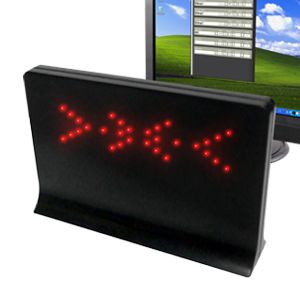
The USB Message Board from Dream Cheeky.
I was looking for a cool christmas present for my brother, and came across this:
The USB Message Board from Dream Cheeky.
Ok, so it has a silly name, but it is a cute little scrolling led display none the less. Unfortunately, it is for Windows only. When I found out that the Hardware Developer Manual was available though, I thought it would be fun to try and write a Linux driver for it. Version 1.0 took a long saturday afternoon to write- about twelve hours.
I set up dcled so that it works like cat. If you run dcled with a list of files, it will cat each of those files to the message board. If you dont name any files at all, dcled reads from stdin, so that you can use it as a pipe. There is also the --message="" option in case you want to send a single line to it.
After using the program for a little while to monitor The Last Outpost game server, I found that I was always missing the first few words of the message-- by the time I noticed something scrolling and looked up to see what it said, the beginning of the text was off screen. I added 'preamble' mode to fix this problem. If you use preamble mode (and there are several diffrent ones now), then just before scrolling the message, a fancy eye-catching graphic is displayed. For some preamble modes, a graphic is displayed at the end of the message too.
When dumping a file with preamble mode enabled, the start graphic gets displayed anytime that the screen hasn't had an update in at least ten seconds. This is useful when you monitor a logfile with tail -f and pipe into dcled. It puts the eye-catcher graphic in front of every new burst of log entries. I usually run with the echo option turned on too, so that the log messages go to the screen as well as to the message board.
Example: tail -f /var/log/messages | dcled -p 2 -e
The full set of options looks something like this:
Usage- dcled [opts] [files]

	--brightness  -b   How bright, 0-2
	--clock       -c   Show the time
	--clock24h    -C   Show the 24h time
	--bcdclock    -B   Show the time in binary
	--debug       -d   Mostly useless
	--echo        -e   Send copy to stdout
	--help        -h   Show this message
	--message     -m   A single line message to scroll
	--nodev       -n   Don't use the device
	--preamble    -p   Send a graphic before the text.
	--repeat      -r   Keep scrolling forever
	--fastprint   -f   Jump to end of message.
	--speed       -s   General delay in ms
	--test        -t   Output a test pattern
	--font        -g   Select a font
	--fontdir     -G   Select a font directory

Available preamble graphics:

	 1 - dots       - A string of random dots
	 2 - static     - Warms up like an old TV
	 3 - squiggle   - A squiggly line
	 4 - clock24    - Shows the 24 hour time
	 5 - clock      - Shows the time
	 6 - spiral     - Draws a spiral
	 7 - fire       - A nice warm hearth
	 8 - bcdclock   - Shows the time in binary

Optional fonts:

	 1 - small      - Very small characters
	 2 - sga        - Standard galactic alphabet
	 3 - small_inv  - Very small inverted characters
You can download version 2.2 of dcled and use it to send text to the message board under Linux, Mac OS X 10.5.6, and perhaps other operating systems for which you can compile libusb. Dcled is a userland program, and shouldn't require any kernel recompiling at all, but you will require the libusb-1.0-dev pacakge to be installed.
Let me know if you find it useful!
Sat Feb 8 21:18:23 PST 2014 - dcled 2.2 released! Added 'tachometer mode', to make the display work as a scriptable gauge. If you run Linux, try the included cpuload program to make dcled monitor your system processor load.
Sat Sep 8 08:10:19 PDT 2012 - dcled 2.1 released! No new functionality in this release, but the usb driver section has been re-written to use the libusb directly instead of going through libhid. This removes the libhid requirement, so building on debian based systems ought to be easier. Big thanks to Lewis Clayton for the libusb primer!
Sat Sep 8 08:21:58 PDT 2012 - Lewis Clayton has written a userland driver in the Ruby language for the Dream Cheeky USB LED Message Board. You can check out his work on GitHub. Way to go, Lewis!
Sat Apr 9 17:52:12 PDT 2011 - A dcled user asked me if I could port dcled over to the "Inland Six Message Programmable LED Badge". Nope, not possible, it turns out. The two devices are very different in how they work. The Inland doesnt provide direct access to the LEDs like the DC does. The Inland one is interesting though in that it can scroll a message on its own after it has been programmed-- there is no need to use the host cpu to drive the leds. That might make it useful as a staus display on a small embedded system like the DLink DIR-825 running OpenWRT.
Luckily, Tim Hentenaar had already reverse engineered the programming protocol for the Inland badge, and had written a GUI to program it. I took his library and implemented a cli programming tool for the badge, and he's incorporated it into his Control Software for the Inland USB LED Badge. It is worth looking at if you can't find the DC message board anymore.